Lead with what matters.
Start with website status, customer activity and a brief summary of the reporting period.

Maintenance, website activity and practical next steps, explained in everyday language. An internal reporting initiative that makes the work after launch visible to the people running the business.
See a real client reportAre people finding us through Google? Are visitors contacting us or using the ordering link? What did your team take care of this period?
These are the questions our reporting is built to answer, with the information available for each website.
Ongoing website care produces a lot of information: software updates, availability checks, performance observations, traffic and search activity. Clients need to understand how those pieces relate to their business.
Our earlier formats contained valuable operational detail, but the most relevant information could be difficult to find. A business owner needed a clear account of the period and the next step.
We developed Palaeli Pro Reports to connect the work behind the scenes with a reporting experience clients can read quickly and understand without technical expertise.
Prioritize the message, explain the available signals and make the team’s responsibilities clear.
Start with website status, customer activity and a brief summary of the reporting period.
Use familiar language for visits, Google visibility, mobile use and relevant website interactions.
Explain maintenance, monitoring and the technical observations that deserve attention.
Tell clients what we are handling and whether any action is needed from them.
This Website Care Report for Mystic Pizza II shows how the approach works in a client update.
Visits, mobile traffic, Google discovery, ordering clicks and tracked contact actions appear first. A short explanation connects the numbers with website care and what our team is watching.
For a restaurant, the ordering link matters. For a service business, contact activity may take priority.
The status section explains what we continue monitoring and tells the client when no action is required.
Example period: August 1–September 30, 2026. Ordering and contact clicks describe website interactions; they do not confirm completed orders or new customers.
Explore the Mystic Pizza II case study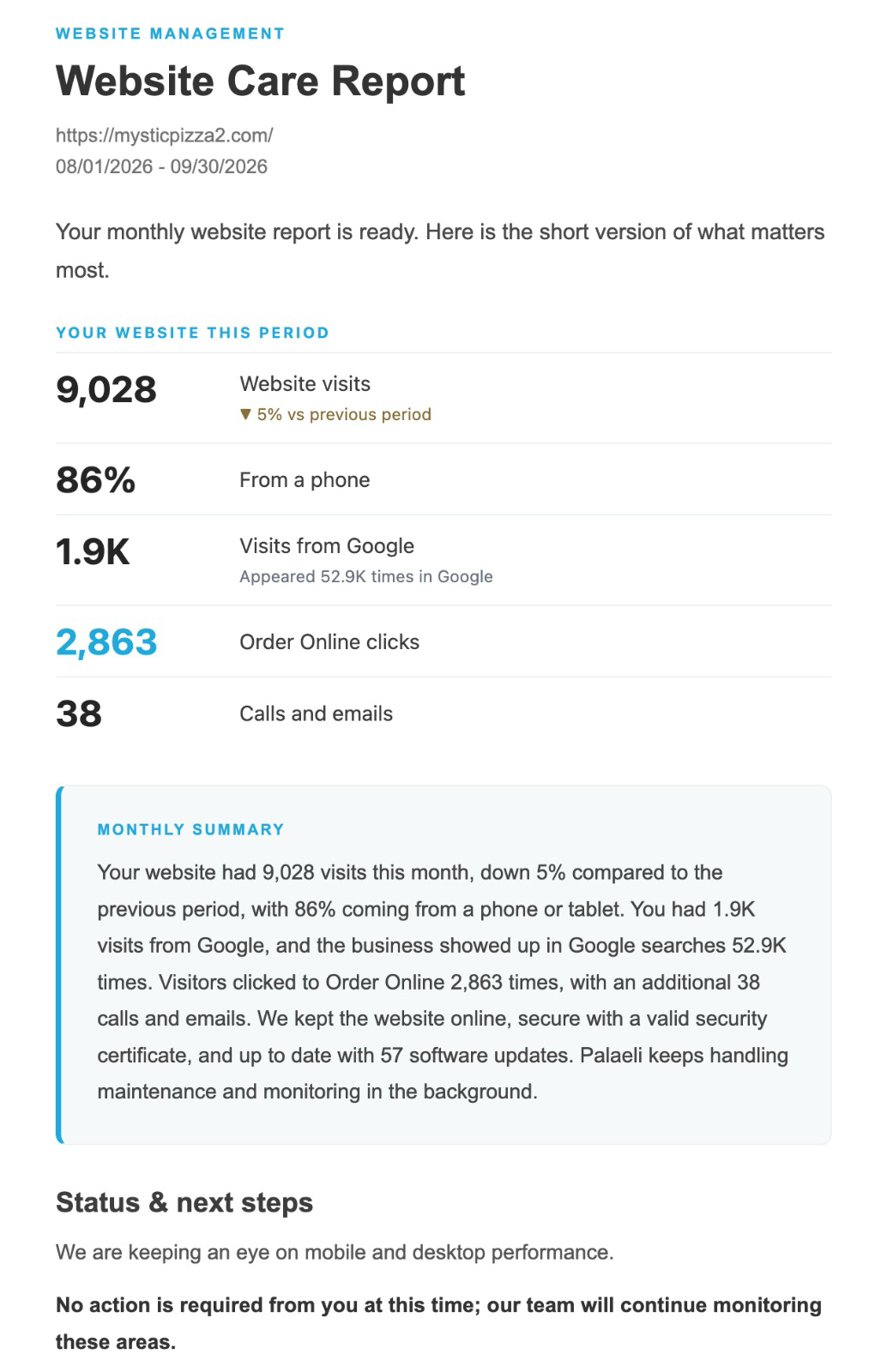
Published client example · Select the image to read the full report
The available information varies with the website, its connected data sources and the reporting period.
Visits, mobile use and tracked actions such as ordering-link clicks or phone and email contact clicks.
WordPress and plugin updates, availability, recorded incidents, certificate status and domain information where available.
Desktop and mobile performance checks, analytics, Google Search impressions and clicks, and supporting technical observations.
Available records of pages and posts created, updated or removed, alongside the website’s ongoing care.
Short explanations of the areas we are watching, the work we are handling and any action needed from the client.
A branded PDF preserves the care activity, health checks and performance information behind the email summary.
A two-level reporting format gives each client a practical way to review the work.
Lead with the most relevant activity, explain the period and make the current status and next steps easy to find.
Provide a more detailed account of website care, health, performance, search visibility and content activity where data is available.
MainWP supports our central WordPress management workflow. The report connects maintenance records with available website signals and the team’s review.
Follow established procedures for updates, website health, availability and issue escalation.
Combine care records with connected traffic, search, performance and content information.
Select the observations that best explain website status and relevant customer activity.
Write concise observations, practical next steps and a clear account of who is handling them.
Send the summary and supporting PDF while maintenance and monitoring continue.
Feedback during real reporting helped us move customer visits and useful interactions higher in the update, with technical detail available in the supporting report.
One reporting version includes a short feedback prompt: Happy, Fine or Not really. It gives clients an easy way to tell us how the website has been working for them.
Their experience adds context to monitoring. We keep refining the wording, structure and data coverage as the workflow is used.
By October 2026, the workflow had been used to generate report examples and deliver website care updates to clients.
Its documented outcome is a more structured way to explain what the website is doing, what our team is doing, what needs attention and what happens next.
The reporting approach continues to evolve with client feedback and the information available for each website.
Website management includes the technical care behind the scenes and the communication that helps a business understand its digital presence.
Palaeli Pro Reports brings those responsibilities together in a reporting experience designed for everyday use.
An internal initiative developed and directed by Palaeli Studio, connecting website operations, reporting workflows and client communication.
Website management · Custom reporting workflows · WordPress maintenance · Website analytics · Client communication · Process improvement
Ongoing WordPress care, technical support and reporting that helps you understand what is happening with your website.
Let’s talk about your websiteExplore website care & maintenance